Attention on DJ software
Are all DJs nerds? Possibly. Are all nerds, DJs? Not yet, but it looks likely.
I watched the thing im doin so you don’t have to.
I thought this was quite interesting this week, apart from everyone deciding to be a DJ, plenty of people are also looking at the tools used in the digital DJ space… especially as Traktor/Native Instruments just had their near death experience.
Deadmau5 has been busy, making a new DJ software application. The whole meandering walkthrough is here and fair enough it’s a demo of work in progress with plenty of “it’ll do this” and some live bugs. The first 30 mins is the basics - table stakes right? All done slightly snappier, and really nice big waveforms which I imagine helps with beatgrid setting though.
From 40mins onwards it get’s more interesting - the USB audio routing connects to Ableton Live Audio, one track per deck. Syncs the clocks. Which I really wanted to do with my CDJ set up + synths, and you know what? I have ended up buying Pamela’s Disco to do that.
What Deadmau5’s rekordbox+ app unlocks is opening all the audio effects of Ableton, locked to the clock. Seems useful. Presumably that can co-exist within the Ableton sequences clips, in a hybrid decks and clips performance? Wasn’t shown.
At 53mins or so we see VSTs (and Audio Units) being added to the in-DJ-app signal path (not in Ableton) which is clocked to the DJ master tempo, can cross sidechain your deck tracks. This also seems useful.
At 60mins we see a bunch of cleanly done if fairly vanilla controller mapping. Does connect OSC/Midi for Touchdesigner which I’m fairly sure isn’t always so easy as this?
At 1:04 he delves into VST instruments - except we don’t as he only had an unlicensed copy of Serum handy. But it looks like it would do similar to the fx, with clock synced macros to the parameters etc. Ok sure, fair.
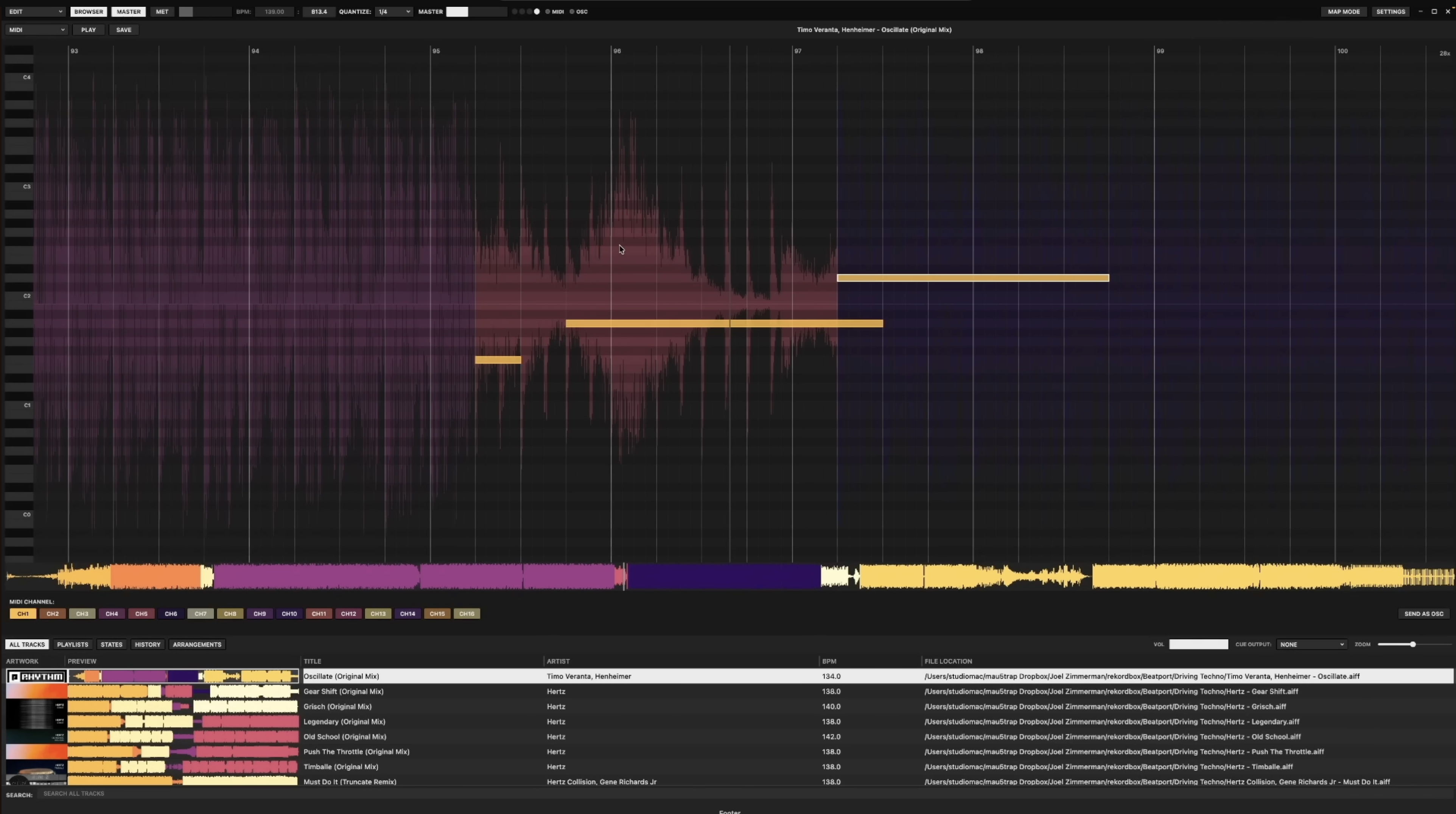
But after that, we see something really fun - adding midi to the clocked audio track. It is exactly as you might imagine - clocked beat and bar grid, with a pianoroll note editor literally overlaid. Seems useful, but if you are synced to Ableton …hmm, maybe not that useful for those people. Good for everyone else, with less money though for sure.
He also adds an OSC layer, with loads of tracks each a message or envelope - all this around 1:11 - and shows it outputting to Touch Designer. This seems useful also, having clocked extra tracks from the one library in the one DJ-ish app? Probably useful.
Finally there’s 1:19 where it’s arrange mode - which let’s you do straight up re-arrangement of an audio track in a DJ app - like move the break from later on and put it earlier and loop it. Or parts from other tracks, all clocked. The ”you need to learn to beatmatch by ear” are going to hate it.
Deadmau5 hints at the obvious abuse of just sequencing your entire set in this, so yeah, that might happen? For sure.